


Securities and Exchange Commission of Pakistan (SECP) is the only regulatory authority in Pakistan to register all type of companies and associates in Pakistan. To regulate this, there is a proper ordinance named Companies Ordinance, 1984 that contains the law and the amendments regarding companies and associates. This Ordinance broadly encompasses all legal requirements for business registered with SECP.
By using the online services of the SECP, the willing person can save almost 50% amount that otherwise will be required in case of consulting with external parties or consultant. Here is the procedure for registering a private company in Pakistan. Most of the instructions are in the direct wording of the Companies Ordinance, 1984.
Online Registration Process
Step 1: Select the appropriate name for the company. It must not be deceptive, or designated to offend the religious susceptibilities of the people, and shall not be identical or have close resemblance to a name by which another company is already registered.
Step 2: You can search for name you want to register from online Company Name Search service of the SECP. To access this, click here
Step 3: If the proposed name is available then moves to the eService of the SECP to for obtaining name availability and subsequent incorporation of a company online. Click for SEPC’s eService.
Log on to eServices:
The client will connect to, https://eservices.secp.gov.pk/eServices, for signup. Click on sign up button to open the Form. Fill in the required information and click on sign up button to submit the Form. User will receive an e-mail containing the user activation link. By clicking on the link, user account will be activated.
Enter Information
A successful logon to eServices by entering user ID and password, and clicking login button, will make available Company Name Reservation process. User will click on the Company Name Reservation process. An input page is displayed, wherein the information will be entered by the
user. After clicking the ‘Continue’ button, the process document listing page is displayed, containing the following links:
- Update Form(s) Data:
Click link if you want to update the data.
- View Company Name Reservation Form:
Click link and view the automatically filled eForm based on your input.
- Fill New Attachment Form:
Click link and an attachment form window will be displayed. Attach document, if any, and click Save Form Button. Please note that only PDF files are allowed for attachment. Process document listing page will be displayed.
- Fill New Bank Challan Form:
Click link and auto filled bank challan will be displayed. Click Print Form Button. Four copies will automatically be printed as original copy, bank copy, SECP copy and depositor copy. After printing, Click Save Form Button. The fee shall be deposited in the Bank branch selected by the applicant from the designated branches of MCB Bank Limited. The bank shall retain the SECP and bank copies and return remaining two copies (original and depositor copy) to the depositor.
Submit the process:
After saving the Bank Challan, Process document listing page will be displayed. Click on Start Process link. All the documents will be automatically submitted to the SECP. The process of the SECP will be initiated as soon as the SECP receives the verification of deposit of fee from the Bank.
MANUAL SUBMISSION OF APPLICATION
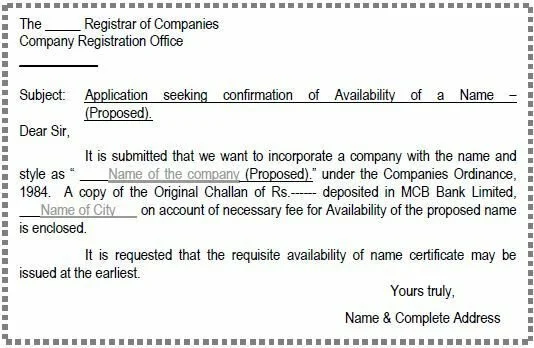
For this purpose, application can be made on a plain paper addressed to the registrar concerned. A specimen of application for seeking availability of name is appended below.
The application fee for the availability of name is Rs. 500/- for each proposed name. The fee can be paid in the designated branches of MCB Bank Limited through Challan Form which is available “Free of Cost” at the “Facilitation Counters” of the CROs and branches of MCB Bank Limited.
On acceptance of application (for a company’s name reservation), the name is reserved for a period of 90 days, further extendable up to the same period on receipt of fresh application.
Confirmation of availability or non-availability of name is instantly sent on the e-mail address (if provided by the company). Simultaneously, letter is also dispatched on the postal address.
Note: You will require at least two directors in case of registering private limited company and at least one director and secretary in case of single member company.