

Zong always comes with the best services and features for its customers. The era in which we are living is the ear of smartness so if you want to get more then work and act smartly. Zong has got this point that’s why it is offering more and more online and internet based services to its subscribers.
Among a lot of services for its customers, one of the best services of Zong is its online recharge service. Now the customers of Zong can get their mobile balance recharged online using the online recharge service of Zong.
Here is the step by step process to available Zong Online Recharge Service
Step 1: First of all you need to activate e-commerce service against your debit or credit card, and for this, you will need to contact your bank because the amount will be directly deducted from your bank account.
Step 2: Now move to this link h ttps://o2oonlinerecharge.zong.com.pk/O2O/PaymentDesign.aspx and chose the desired service (prepaid for online recharge or postpaid for mobile bill payment).
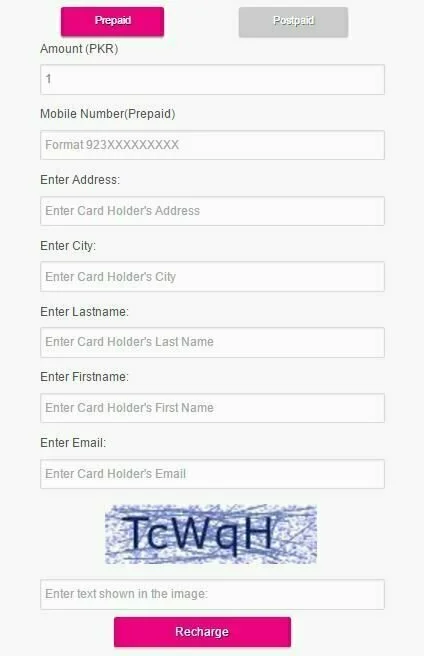
Step 3: The first page requires you to enter your mobile number in the specified format its type (pre-paid or post-paid), the amount of your recharge, your address, city, first name, last name and your e-mail address.
Step 4: Next page will request you to confirm your recharge amount, mobile number, and e-mail address. You will receive a tracking ID via SMS.
Step 5: You will then be redirected to the next page powered by HBL which requires you to enter your card account details i.e. your Card type, Card Number, Card Expiry date and CVV2/CVN Code (3 digit code on the back of your Card).
Terms and Conditions
- The maximum amount that can be transacted on any Zong number in one go is PKR 10,000 for Pre-paid and Post-paid both. The minimum amount that can be transacted is Rs 1. Unlimited transactions can be done on any Zong number in 24 hours period.
- Please note that Zong on its website does not require you to enter any of your Card Account Details and consequentially does not store or maintain your card details to ensure card account information security. The Card details required during the transaction are entered on a portal maintained by a third party (Cybersource) under globally recognized PCIDSS requirements (Payment Card Industry Data Security Standards)
- Please do not in any way whatsoever give your Card Account details to anyone or on any suspicious websites, including any person representing to be a part of Zong’s workforce, whether on Zong’s authorized touch-points (CallCenter, Franchise, CSC, Retailer, Web Chat,) or otherwise. There is no refund or reversal of your transaction, so please verify the transaction amount before your proceed.
- Please ensure that your power supply and Internet connection remain active through the transaction.
- If you believe that an amount has been deducted, but the recharge amount has not been credited to your account, please dial 310 to lodge a complaint.
- You must use your own card to make payment online. In case, payment is made through any counterfeit or stolen credit/debit card Zong reserves the right to block the service and recover the dues.